
LCD
简介
基于HD44780控制器的字符型LCD,常见型号包括 LCD1602 和 LCD2004。这类LCD可以使用并行接口与开发板连接,也可使用PCF8574等I/O扩展芯片通过I2C接口控制。HD44780支持显示数字、字母、符号及用户自定义字符。
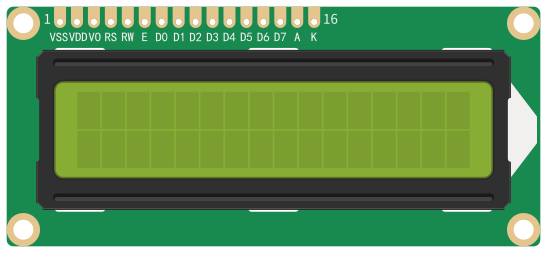
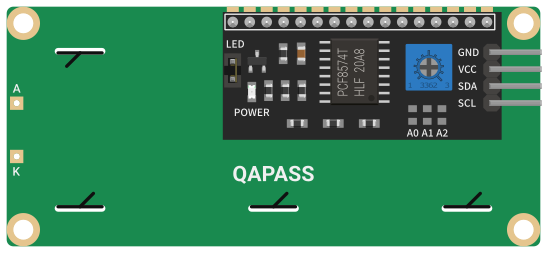
接口:并行接口/I2C(PCF8574)
使用并行接口时,需要占用6个GPIO(不包含背光控制)。
提示
HD44780模块有 5 V 与 3.3 V 型号可选,请注意区分。
指令
- 模块名称:
- lcd
config
config指令使用模块配置的 标准模板。
参数说明
- device
[array] (!)设备配置对象数组。- name
[string] (?)用户定义的设备名。最大长度15个字符。当模块只有单一设备时可以省略。 - remove
[bool] (?)为true时,释放并移除设备。模块有多个设备时,通过 name 指定。默认false。 - i2c_device -
[object] (?)I2C设备配置对象。当LCD通过PCF8574连接I2C接口时配置,使用并行接口时不用配置。- i2c_num
[int] (!)已配置的I2C接口序号。 - address
[int] (?)PCF8574的I2C设备地址。默认值39(0x27)。 - speed_hz
[int] (?)SCL频率,单位赫兹。默认值100000(100 kHz)。
- i2c_num
- pins
[object] (?)HD44780的引脚连接配置。该配置对象的各属性对应HD44780的各引脚。当使用PCF8574转接时,各属性值对应所连接PCF8574输出口P0~P7的序号;当使用并行接口连接时,各属性值对应所连接开发板的GPIO序号。默认值适用于常见的PCF8574转接板。- rs
[int] (!)RS(Register Select)引脚连接。默认值0。 - e
[int] (!)E(Clock Enable)引脚连接。默认值2。 - d4
[int] (!)D4(Data Bit 4)引脚连接。默认值4。 - d5
[int] (!)D5(Data Bit 5)引脚连接。默认值5。 - d6
[int] (!)D6(Data Bit 6)引脚连接。默认值6。 - d7
[int] (!)D7(Data Bit 7)引脚连接。默认值7。 - bl
[int] (?)BL(Backlight)引脚连接。默认值3。
- rs
- font_size
[int] (?)字符尺寸,默认值8。可选值:8- 5x810- 5x10
- lines
[int] (?)屏幕显示行数,默认值2。可选值:2、4。 - backlight
[bool] (?)为true时,打开背光;为false时,关闭背光。默认true。
- name
样例
使用PCF8574的默认参数配置:
json[ { "action": "config", "i2c": { "i2c_num": 0, "sda": 15, "scl": 16 } }, { "module": "lcd", "action": "config", "device": { "name": "foo", "i2c_device": { "i2c_num": 0 } } } ]样例使用指令数组形式,先配置I2C总线,再配置LCD。
使用并行接口连接开发板的GPIO:
json{ "module": "lcd", "action": "config", "device": [ { "name": "foo", "pins": { "rs": 6, "e": 7, "d4": 15, "d5": 16, "d6": 17, "d7": 18 } } ] }
display
display控制LCD显示多行数据。该指令无应答。
参数说明
- device
[string] (?)要操作的设备名。当模块只有单一设备时可以省略。 - backlight
[bool] (?)为true时,打开背光;为false时,关闭背光。 - clear
[bool] (?)为true时,清除屏幕;为false时,不清除屏幕(叠加显示)。默认true。 - data
[array] (?)行数据对象数组。- line
[int] (?)要显示数据的行索引(0-based)。默认值0。 - col
[int] (?)要显示数据的列索引(0-based)。默认值0。 - text
[string] (!)要显示的数据文本。
- line
样例
json
{
  "module": "lcd",
  "action": "display",
  "device": "foo",
  "backlight": true,
  "data": [
    {
      "line": 0,
      "col": 0,
      "text": "Node-MQ"
    },
    {
      "line": 1,
      "col": 0,
      "text": "1234567890ABCDEF"
    }
  ]
}
提示
使用PCF8574转接板时,若屏幕字符不清晰,可以通过转接板上的可变电阻调节屏幕对比度。
scroll
scroll控制LCD显示内容水平滚动。该指令无应答。
参数说明
- device
[string] (?)要操作的设备名。当模块只有单一设备时可以省略。 - left
[int] (?)向左滚动字符数。 - right
[int] (?)向右滚动字符数。
样例
json
{
  "module": "lcd",
  "action": "scroll",
  "device": "foo",
  "left": 5
}
upload_char
upload_char上传用户自定义的字符数据。该指令无应答。
当屏幕字符尺寸为5x8时,可设置8个自定义字符;当字符尺寸为5x10时,可设置4个自定义字符。
上传字符按索引 index 参数指定的位置保存。在显示文本中通过JSON转义索引(偏移\u0008)来显示自定义字符。索引位置0的字符,对应的JSON字符表示为\u0008,位置1的字符对应\u0009,以此类推。
5x8尺寸的字符由8个字节数据编码为Hex文本表示,5x10尺寸的字符由10个字节数据编码为Hex文本表示。自定义字符工具请参考 Custom Character Generator。
提示
自定义字符存储于HD44780的CGRAM中,断电后将丢失。
参数说明
- device
[string] (?)要操作的设备名。当模块只有单一设备时可以省略。 - index
[int] (?)自定义字符的存储位置索引。默认值0。 - data
[string] (!)自定义字符数据的Hex文本表示。
样例
上传自定义字符:
json{ "module": "lcd", "action": "upload_char", "device": "foo", "index": 0, "data": "040E0E0E1F000400" }自定义字符
040E0E0E1F000400形如:
显示自定义字符:
json{ "module": "lcd", "action": "display", "device": "foo", "backlight": true, "data": { "line": 0, "col": 0, "text": "\u0008 Hello world!" } }