OLED
简介
基于SSD1306控制器的单色点阵型OLED,常见屏幕尺寸(分辨率)有 0.96"(128×64)、1.3"(128×64)以及 0.91"(128×32)。这类OLED可以使用I2C或4线SPI接口与开发板连接。SSD1306支持像素操作,适合于显示文本、图形或位图等内容。
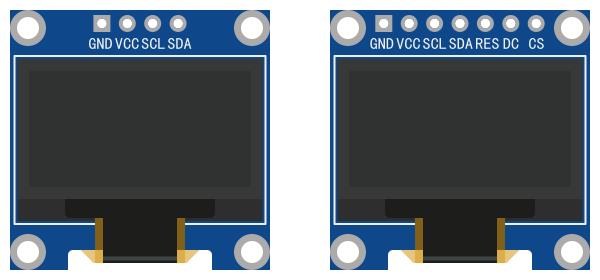
接口:I2C/4线SPI
4线SPI接口包括:MOSI、SCLK、CS、DC(Data/Command),另有一可选的RESET引脚。
指令
- 模块名称:
- oled
config
config指令使用模块配置的 标准模板。
参数说明
- device
[array] (!)设备配置对象数组。- name
[string] (?)用户定义的设备名。最大长度15个字符。当模块只有单一设备时可以省略。 - remove
[bool] (?)为true时,释放并移除设备。模块有多个设备时,通过 name 指定。默认false。 - width
[int] (?)屏幕宽度(像素),默认值128。可选值:64、96、128。 - height
[int] (?)屏幕高度(像素),默认值64。可选值:16、32、64。 - i2c_device -
[object] (?)I2C设备配置对象。当使用I2C接口时配置,使用SPI接口时不用配置。- i2c_num
[int] (!)已配置的I2C接口序号。 - address
[int] (?)I2C设备地址。默认值60(0x3C)。 - speed_hz
[int] (?)SCL频率,单位赫兹。默认值400000(400 kHz)。
- i2c_num
- spi_device -
[object] (?)SPI设备配置对象。当使用SPI接口时配置,使用I2C接口时不用配置。- spi_num
[int] (!)已配置的SPI接口序号。 - mode
[int] (?)设备SPI模式,默认值0。可选值:0、1、2、3。 - speed_hz
[int] (?)SCLK频率,单位赫兹。默认值4000000(4 MHz)。 - cs
[int] (!)设备片选(CS)引脚的GPIO序号。
- spi_num
- dc
[int] (?)DC(Data/Command)引脚的GPIO序号(使用SPI接口时需要)。 - rst
[int] (?)可选RESET引脚的GPIO序号。
- name
样例
使用I2C接口:
json[ { "action": "config", "i2c": { "i2c_num": 0, "sda": 15, "scl": 16 } }, { "module": "oled", "action": "config", "device": { "width": 128, "height": 64, "i2c_device": { "i2c_num": 0, "address": 60 } } } ]- 样例使用指令数组形式,先配置I2C总线,再配置OLED。
- 单一设备省略 device 的 name 参数,并使用单元素数组简写形式。
使用SPI接口:
json[ { "action": "config", "spi": { "spi_num": 0, "mosi": 10, "sclk": 11 } }, { "module": "oled", "action": "config", "device": { "remove": false, "width": 128, "height": 64, "spi_device": { "spi_num": 0, "cs": 12 }, "dc": 13, "rst": 14 } } ]- 样例使用指令数组形式,先配置SPI总线,再配置OLED。
- SSD1306不需要SPI接口的MISO引脚,对应的SPI接口只需要配置MOSI和SCLK引脚。
- 单一设备省略 device 的 name 参数,并使用单元素数组简写形式。
display
display控制OLED显示数据。该指令无应答。
OLED的显示坐标原点(0, 0)为屏幕左上角。
OLED字体原始尺寸为6x8(像素)。参数 font_size 用于设置字体尺寸比例(整数)。例如,font_size 设置为2时,字体放大为原始尺寸的2倍(12x16)。font_size 设置后将保持不变,直到下一次设置。
参数说明
- device
[string] (?)要操作的设备名。当模块只有单一设备时可以省略。 - clear
[bool] (?)为true时,清除屏幕;为false时,不清除屏幕(叠加显示)。默认true。 - data
[array] (?)显示数据对象数组。支持以下类型的数据对象,可任意组合使用:- 文本数据对象。JSON属性定义:
- text
[string] (!)要显示的字符串。 - font_size
[int] (?)字体尺寸比例值。 - x
[int] (!)显示文本的起点X坐标。 - y
[int] (!)显示文本的起点Y坐标。
- text
- 整型数据对象。JSON属性定义:
- int
[int] (!)要显示的整数值。 - font_size
[int] (?)字体尺寸比例值。 - x
[int] (!)显示数值的起点X坐标。 - y
[int] (!)显示数值的起点Y坐标。
- int
- 浮点(小数)数据对象。JSON属性定义:
- float
[float] (!)要显示的浮点值。 - font_size
[int] (?)字体尺寸比例值。 - x
[int] (!)显示数值的起点X坐标。 - y
[int] (!)显示数值的起点Y坐标。
- float
- 直线数据对象。JSON属性定义:
- plot
[string] (!)绘图类型,直线类型固定值line。 - x0
[int] (!)直线起点X坐标。 - y0
[int] (!)直线起点Y坐标。 - x1
[int] (!)直线终点X坐标。 - y1
[int] (!)直线终点Y坐标。
- plot
- 矩形数据对象。JSON属性定义:
- plot
[string] (!)绘图类型,矩形类型固定值rect。 - x0
[int] (!)矩形左上角X坐标。 - y0
[int] (!)矩形左上角Y坐标。 - w
[int] (!)矩形宽度。 - h
[int] (!)矩形高度。 - r
[int] (?)圆角半径,默认值0。 - fill
[bool] (?)为true时,绘制填充。默认false。
- plot
- 圆形数据对象。JSON属性定义:
- plot
[string] (!)绘图类型,圆类型固定值circle。 - x0
[int] (!)圆心X坐标。 - y0
[int] (!)圆心Y坐标。 - r
[int] (!)圆半径值。 - fill
[bool] (?)为true时,绘制填充。默认false。
- plot
- 三角形数据对象。JSON属性定义:
- plot
[string] (!)绘图类型,三角类型固定值triangle。 - x0
[int] (!)三角形顶点0的X坐标。 - y0
[int] (!)三角形顶点0的Y坐标。 - x1
[int] (!)三角形顶点1的X坐标。 - y1
[int] (!)三角形顶点1的Y坐标。 - x2
[int] (!)三角形顶点2的X坐标。 - y2
[int] (!)三角形顶点2的Y坐标。 - fill
[bool] (?)为true时,绘制填充。默认false。
- plot
- 文本数据对象。JSON属性定义:
样例
json
{
  "module": "oled",
  "action": "display",
  "clear": true,
  "data": [
    {
      "text": "Node-MQ",
      "font_size": 2,
      "x": 22,
      "y": 6
    },
    {
      "plot": "line",
      "x0": 10,
      "y0": 26,
      "x1": 118,
      "y1": 26
    },
    {
      "plot": "rect",
      "x0": 0,
      "y0": 0,
      "w": 128,
      "h": 64
    },
    {
      "plot": "rect",
      "x0": 16,
      "y0": 33,
      "w": 25,
      "h": 25,
      "r": 1
    },
    {
      "plot": "circle",
      "x0": 64,
      "y0": 45,
      "r": 12
    },
    {
      "plot": "triangle",
      "x0": 100,
      "y0": 33,
      "x1": 88,
      "y1": 57,
      "x2": 112,
      "y2": 57
    }
  ]
}
样例适用于分辨率为128×64的屏幕,显示内容如图: